

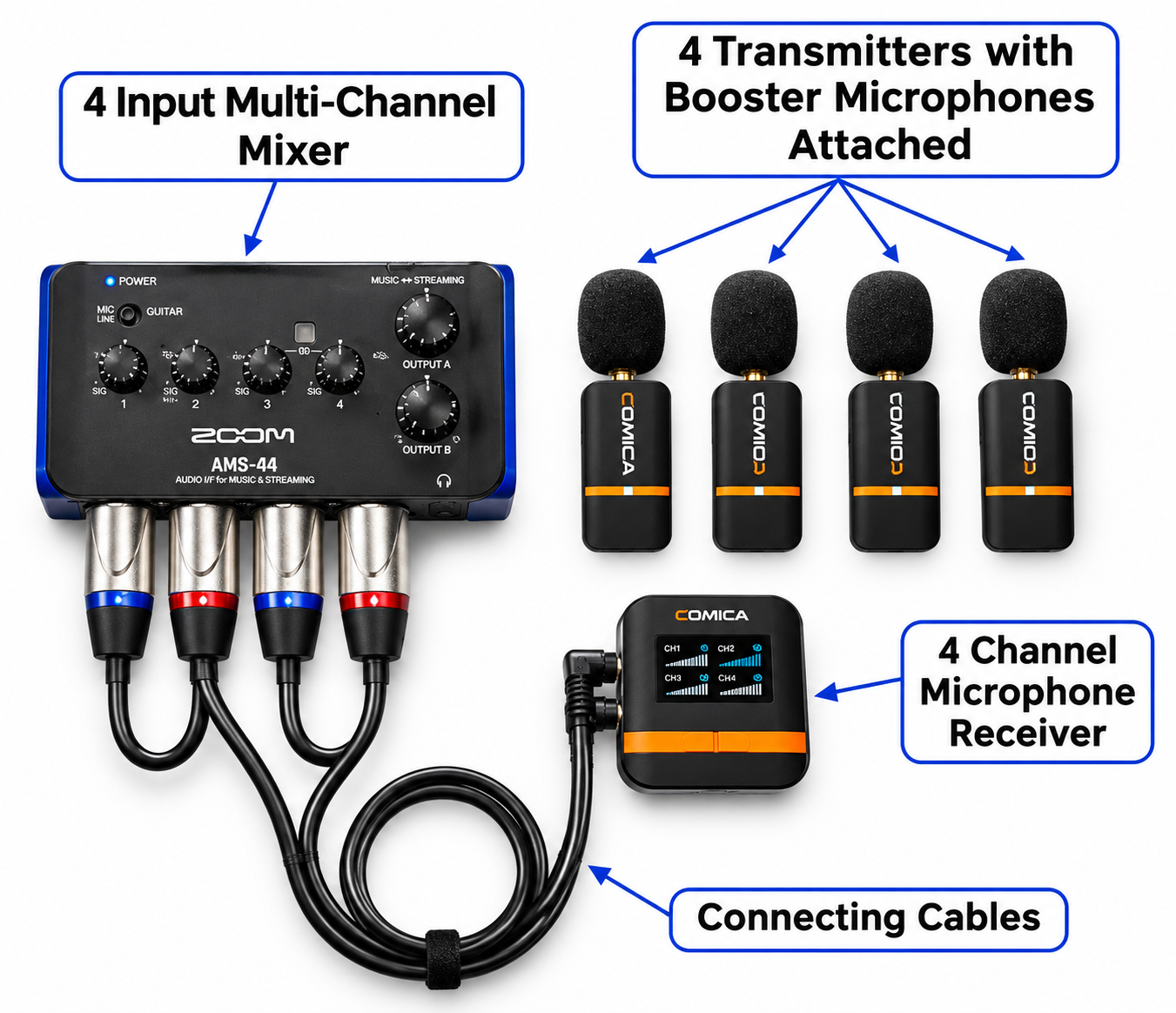

Key Features
The required items are pre-selected above. You can also add or remove any optional items to customize your setup.
-
Designed for court reporters using Eclipse, Case CATalyst, ProCAT, and other CAT programs
-
Four XLR combo inputs
-
Two 1/4″ TRS outputs for backup recordings
-
USB output
-
Switchable 48V phantom power (IMPORTANT: Turn off phantom power when using wireless systems. Failure to do so may cause damage that is not covered under warranty.)
-
Two 3.5mm headphone jacks for live monitoring
-
Compatible with computers and mobile devices
-
Supports recordings up to 24-bit/96 kHz
-
Direct monitoring and loopback functionality
-
Power options: USB, AA batteries, or AC adapter
Interface Features
Court reporters looking for a compact and versatile audio interface will appreciate its streamlined design and easy-to-use features. This ultraportable interface offers four XLR microphone inputs, two TRS outputs for backup recordings, two headphone jacks, and a USB Type-C connection. It also includes dedicated modes for streaming and recording applications.
Simply connect your microphones to the XLR inputs and monitor your audio through either of the two 3.5mm headphone jacks. The interface supports 24-bit recordings at sampling rates up to 96 kHz.
The interface can be powered directly through your computer’s USB connection. Alternatively, it can operate using two AA batteries or an AC power adapter (sold separately), making it convenient to use with smartphones and tablets.
Inputs, Outputs, and Compatibility
-
4 XLR Inputs, 2 TRS Outputs, and 2 Headphone Jacks
-
Includes four XLR combo inputs, two 3.5mm headphone outputs, and two TRS outputs for connecting to a backup recording device, such as a steno writer or digital recorder.
-
Compatible with Mac and PC computers, as well as iOS and Android devices. The interface integrates seamlessly with commonly used CAT software, apps, and platforms.
-
In Streaming mode, all inputs are combined into a single audio signal, allowing you to stream without needing additional complicated software.
Quick Controls
The interface features convenient onboard hardware switches that simplify common streaming tasks without requiring additional software. Intuitive control knobs allow you to easily adjust microphone input gain and monitoring levels.
Onboard Live Monitoring
Use the Direct Monitor switch to send the input audio directly to your headphones while simultaneously routing the same signal to your CAT software.
Loopback Function
The Loopback switch combines your microphone input audio with playback from your computer and sends the combined signal to your streaming software.
Important Information for Eclipse Users
If you plan to use Eclipse CAT software with your new audio system, please contact Advantage Software to ensure that your Eclipse software is up to date. Some audio interfaces require Version 10 or higher to support multi-channel features.
Wireless Microphone Details
For more information about the Comica four-microphone/transmitter wireless system, visit the link below:
Click here for details on the Comica 4-microphone/transmitter wireless system



Reviews
There are no reviews yet.