

Click here to download installation instructions
Capture Every Voice. Protect the Integrity of Your Record.
For court reporters, every word matters. When reporting a remote deposition, hearing, or other online proceeding, you need a reliable way to capture the audio of every participant—including your own voice—for transcript preparation and verification.
This Teleconference Recording Connection Kit routes the conference audio directly into your CAT software, helping you create a high-quality recording of the entire conversation without complicated audio connections or an unnecessarily complex setup.
Whether you’re using Eclipse, Case CATalyst, or another CAT program, this Mac- and Windows-compatible kit helps simplify your remote reporting workflow. Use a single computer for convenience, or configure a second computer to view participants while your CAT computer handles the recording.
Don’t leave gaps in your audio record. Get the complete conference audio you need to support your reporting workflow. Order your Teleconference Recording Connection Kit today and be prepared for your next remote deposition or proceeding!
Teleconference Recording Connection Kit
Record all participants in your Zoom, GoTo Meeting, or other online conference directly into your CAT (computer-aided transcription) or other audio recording software. This kit is compatible with Mac and Windows computers and works with virtually any CAT program.
The easiest solution for joining and recording a teleconference using a single computer!
This kit includes the connections you need to participate in an online conference while capturing the audio of all participants, including yourself, directly into your CAT or other audio recording software.
Want to Use Two Computers? No Problem!
You can also use this system with two computers if you prefer to view your conference participants on a separate screen.
Simply join the meeting on your second computer and mute its audio. Use your CAT computer, with this recording kit connected, to capture the conference audio. You can watch everyone on one computer while recording all participants on the other.
Mac Users: This System Works for You, Too!
Whether you use one computer or two, this system supports your workflow.
For example, you can use your Mac to view and participate in a Zoom meeting while using a Windows computer to run your CAT software and record the audio.
Here’s how it works:
-
Join the Zoom meeting on your Mac as usual so you can see the other participants on your Mac’s screen.
-
Join the same meeting on your Windows CAT computer with this recording kit connected.
-
Capture the conference audio directly into your CAT recording software.
With this setup, you can hear the other participants, they can hear you, and the audio of everyone—including your own voice—is recorded in high fidelity.
Selecting the Headset Option
The Andrea headsets are ultra-lightweight and do not provide any noise reduction. They allow you to hear what is happening in the room around you. The remaining headset options all provide Passive Noise Filtering (Noise Isolation) as described below. The main difference between active noise cancellation (ANC) and passive noise filtering (Noise Isolation) is how they reduce unwanted background noise.
Which Is Better for Court Reporters?
For court reporters, deposition recording, Zoom (remote) sessions and audio monitoring, passive noise-isolating headsets/headphones are often a good choice because they provide consistent sound isolation without introducing electronic noise-cancellation processing.
Active noise cancellation can be helpful when working in noisy environments, but it is important to choose headphones that reproduce voices accurately.
One important distinction: Neither technology improves the quality of the original microphone recording. They only affect how much outside noise reaches the listener.
1. Active Noise Cancellation (ANC)

Active noise cancellation uses built-in microphones and electronic circuitry to detect surrounding noise and generate opposing sound waves that help cancel it out.
-
Electronic technology: Uses microphones and specialized circuitry to reduce background noise.
-
Reduces low-frequency noise: Particularly effective against airplane engines, air conditioners, fans, and traffic.
-
Requires power: Typically operates using a rechargeable battery.
-
Best for: Travel, offices, noisy environments, and reducing continuous background sounds.
2. Passive Noise Filtering (Noise Isolation)
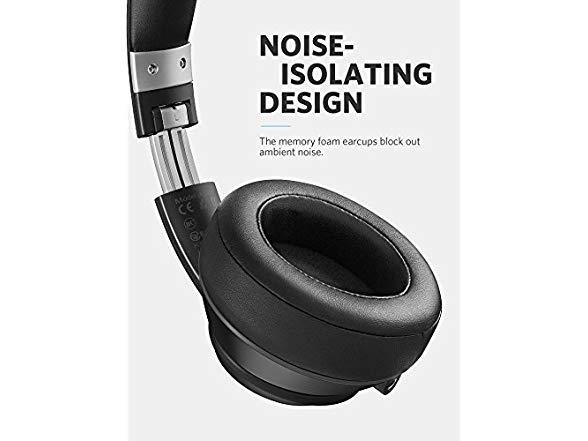
Passive noise filtering reduces unwanted sound through the physical design and materials of the headphones. Cushioned earcups or snug-fitting ear tips create a seal that blocks sound from reaching your ears.
-
Physical noise reduction: Uses padding, foam, and acoustic materials to block outside noise.
-
No electronics required: Does not require batteries or additional power.
-
Blocks higher-frequency sounds: Can help reduce conversations, keyboard clicks, and other environmental sounds.
-
Best for: Recording, audio monitoring, office work, and situations where you want to hear audio without electronic noise cancellation.
Side-by-Side Comparison
|
Feature |
Active Noise Cancellation |
Passive Noise Filtering |
|---|---|---|
|
How it works |
Electronic sound cancellation |
Physical sound blocking |
|
Requires batteries |
Yes |
No |
|
Reduces engine noise |
Excellent |
Moderate |
|
Reduces nearby conversations |
Somewhat |
Varies by fit |
|
Reduces keyboard clicks |
Limited |
Often effective |
|
Affects audio reproduction |
Can, depending on design |
Generally less electronic processing |
|
Maintenance |
Battery and electronics |
Minimal |
Need a Dedicated Two-Computer System?
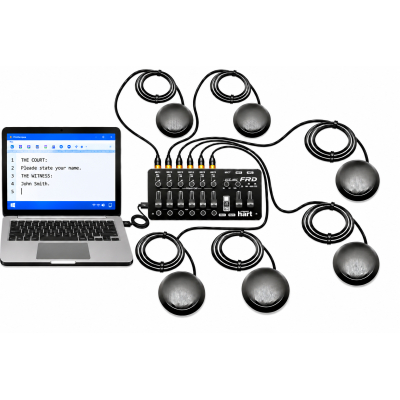
If you’re using a Windows computer and want to run Zoom, Microsoft Teams, Webex, or other conferencing software on a separate computer or device from your CAT recording computer, see our dedicated two-computer recording system:



Reviews
There are no reviews yet.